
You know the dance.
You start a new page in Gutenberg. You drop a Group block. Then a Columns block. Then a Cover. Then you realize you actually need a <section> with a specific ARIA role, a custom grid, and a hover state the core blocks can’t reach. So you install a plugin. Then another. Then you write custom CSS, but where? Customizer? Site Editor’s Additional CSS? Per-block Advanced field? theme.json? Six months later, debugging a style override is an archaeological dig.
Gutenberg was built as a content editor. Paragraphs, headings, images, lists. Abstract content types that render HTML on the way out. That works fine for posts. It breaks the moment you want to build a page, where you have to lay out semantic structure, control markup, own the styles.
Unblock makes the shift explicit. Every block in the editor maps 1:1 to a real HTML element. A Group block is a <div>. A Heading is an <h2>. A Section is a <section>. No abstraction layer, no shortcode soup, no wrapper hell. What you build in the editor is what ships to the browser.
It came out of rewriting WP Grid Builder . Working with the editor as a standalone canvas, outside the post editor, made obvious how much of it was already there, just hidden behind walls.
The name carries two ideas. In French, un bloc means “one block”, the core architecture. In English, unblock means freeing the editor from its limits.
One block, one element
Section, Container, Div, Anchor, SVG, Heading, Paragraph: these aren’t separate blocks. They’re variations of the same block, registered under different names for convenience in the inserter. Behind the scenes it’s always one block outputting one HTML element.
Each one gives you:
- Any HTML tag.
<section>,<article>,<figure>,<details>,<main>, anything semantic. - Any HTML attribute.
id,class,data-*,aria-*,role, custom attributes. - Custom CSS. Selectors, at-rules and variables attached to the block, stored globally, reusable across the site.
- JavaScript interactions. Dynamic components attached directly on the block.
- Dynamic data. Twig-like expressions that pull from posts, users, terms, and site data.
Quick example: a button with an icon. Native WordPress can’t do it. Other plugins ship button blocks with fixed icon positions and constrained styling. With Unblock, you compose it from real elements: an Anchor (<a>), a nested SVG (<svg>), and raw text for the label. You own every detail.
CSS, the way it actually works
Most page builders, and Gutenberg itself, pretend CSS is per-block. You style a button in the inspector, the styles end up inline on that one button, and the next button needs the same trip through the controls. The output is bloated. The cascade is broken.
Unblock takes the opposite approach. CSS is global. It lives in one place.
You attach a selector to a block (a class, an id, a custom selector) and that selector becomes a real CSS rule, stored centrally with all the others. Re-attach it elsewhere? Same rule, applied again. Selectors and at-rules are tokenized: rename a class, swap a breakpoint, the change propagates everywhere it’s used.
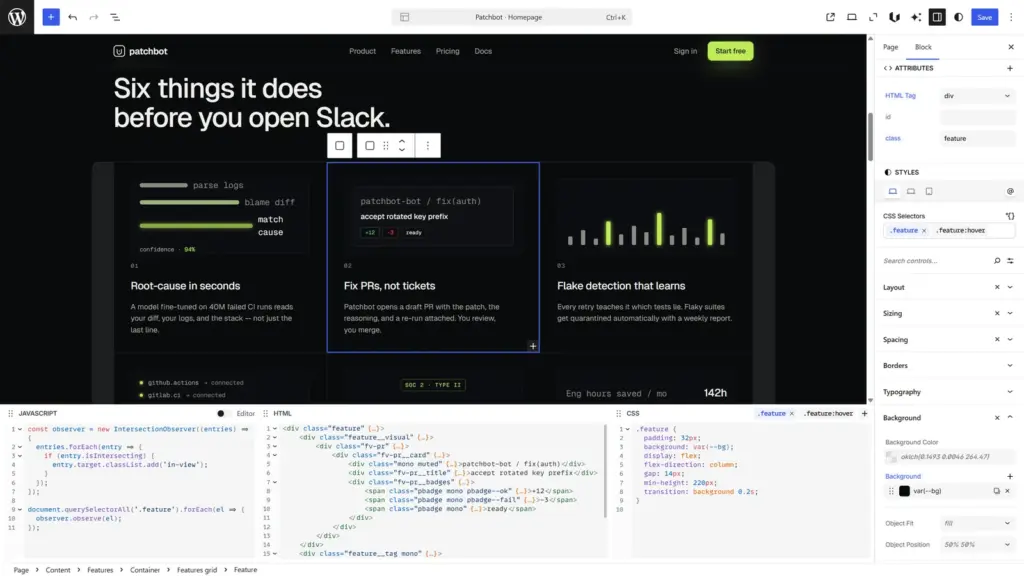
The block inspector gives you the familiar visual editing: inputs, buttons, color pickers. But every change there edits the global rule, not inline styles on the block.
The built-in code editor docks at the bottom of the editor by default, like a browser dev tools panel. It stays in two-way sync with the inspector. Type a border-radius in the code, the matching control updates. Change the value in the inspector, the code updates. Edit either side, the other follows.
Dynamic data, with Twig under the hood
Static markup runs out fast. Query loops, featured images, custom fields and suddenly you’re fighting the builder’s data layer. Most invent their own binding syntax: in-house, narrow, capped by what the team had time to ship. Past the basics, you wait for the next release or fall back to PHP. And every expression you’ve already written is locked to that dialect.
Unblock’s dynamic data layer is a 1:1 mapping with Twig and Timber. Same syntax, different engine: a real-time Pratt parser, evaluated as the page renders, no template compilation step. If you’ve written a Timber template before, you already know the syntax. Posts, terms, users, site, query: same providers, same structure. Nearly every Twig filter is exposed, including the array filters most builders don’t ship at all.
Variables are where it opens up. Want a paginated query? Run the query into a variable, apply pagination on it (native Twig syntax), loop over the result. The loop block itself is pure. No wrapper, no enforced markup. It iterates whatever you put inside it.
The same logic powers dynamic patterns: a saved pattern that uses {{ }} expressions internally, and a variable defined upstream that the pattern reads from. Drop the pattern anywhere, change the variable, the pattern adapts.
Built-in AI, native by design
The CSS side has a full visual interface today. For loops, conditions, and queries, you’re writing Twig and array-like notation directly. If you’re comfortable with that, you can build anything. A full visual interface for the data side ships after beta.
If you’re not, the AI assistant handles it. Here’s why it works the way it does.
Unblock speaks standards: HTML, CSS, JavaScript, Twig. No proprietary schema, no custom JSON dialect the LLM has to learn. Any modern LLM already speaks Unblock’s “language” out of the box, because it’s the language of the open web. The engine translates between blocks and standards in both directions.
The chat feels natural. A single prompt like “change the title of this section, swap the avatar image here, and add a pricing table below” gets handled in one go. The model writes HTML, CSS, expressions; Unblock plugs them into the right blocks.
It runs on the WP AI Client (built into WordPress 7.0) and WP Connectors, both standardized in core. You bring your own key (Anthropic, OpenAI, whoever) and the assistant runs against your own quota. Optional, gated by your license, not a metered service we resell to you.
Where it stands today
Unblock is in beta. The core is stable, the docs are live, the demos are running. The launch is a Lifetime Deal (Early Bird seats first, Standard after). The public buy page isn’t open yet.
What is open: the demos. No install, no signup, no credit card. Build a section, nest some elements, write some CSS, watch it render. The fastest way to understand Unblock is to spend 90 seconds in a demo.
You don’t replace the editor. You reconcile with it. It’s the editor you already use, without needing a page builder.