Blog Announcements
Unblock MCP: Your AI Agent, Working Inside WordPress
- Written by
- Loïc Blascos
- Published
- Reading time
- 5 min
With the MCP Bridge, the AI app you already use works directly on your WordPress site, including a site that is already live. It builds pages, templates and styles in clean Gutenberg blocks, and you decide what goes online.
Unblock 1.0 brought AI into the editor, with a chat for the page you have open. The MCP Bridge opens the whole site to Claude Code, Codex, Cursor, ChatGPT or any other MCP client. Your agent can plan a site, build it and audit it, and you edit what it made like any other page.
Read the MCP docs · Get Unblock
What your agent can do
MCP, the Model Context Protocol, is the open standard AI apps use to work with other software. Unblock turns your site into a set of tools for it, so in one conversation your agent can:
- build pages, and the header, footer and post templates
- write the styles on shared design tokens and install the fonts
- add images to the media library, with their alt text
- install the plugins the site needs from WordPress.org
- create post types and custom fields with ACF, Secure Custom Fields, Meta Box, Pods or JetEngine, and list them in real loops
- write the content, and the SEO titles and descriptions in Yoast SEO, Rank Math, SEOPress or All in One SEO
The agent writes HTML, CSS, JavaScript and Twig, the code AI models know best, and Unblock turns each HTML element into a native Gutenberg block. You end up with a normal WordPress site on a design system, which you or your client keep editing in the editor, with or without AI.
Set up in a few minutes
In the editor, open the Unblock AI sidebar, go to the MCP tab and pick your client. The tab gives you the URL or the command that client needs, and installs the free MCP Adapter plugin if your site doesn’t have it yet.
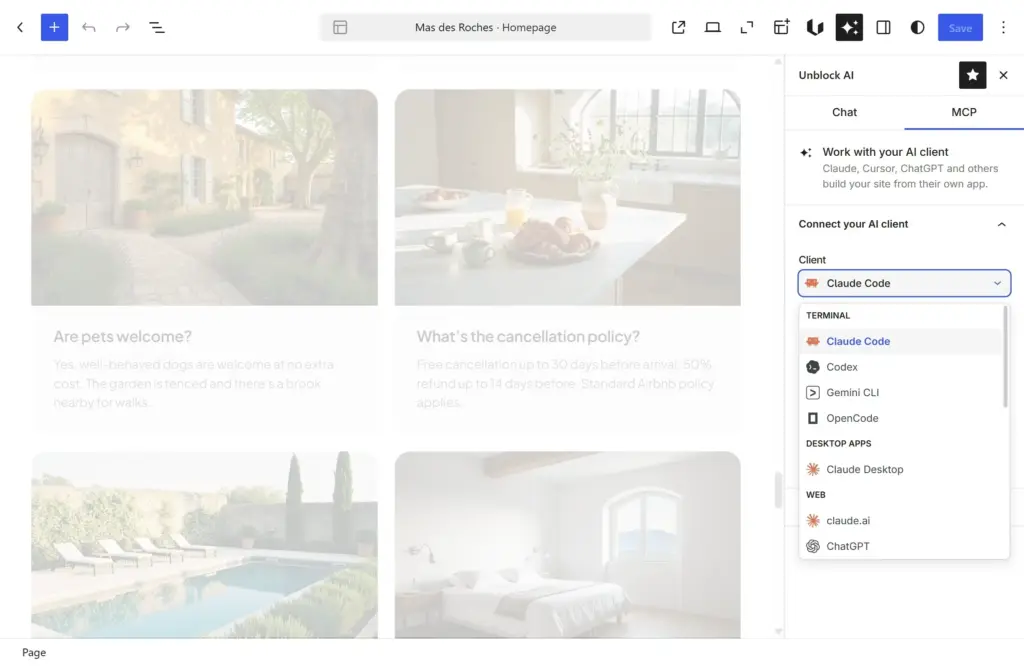
Most clients connect with OAuth. Your site shows an approval page where you choose Full access or Read only. A local site can use WP-CLI instead, and an application password works everywhere else. To check the connection, ask your agent “What pages does my site have?” It should list them.
From there, ask the way you would brief a developer who knows the site:
“Build our About page in our site styles: our story, the four people of the team with their photos from the media library, and a contact button. Keep it as a draft.”
The agent first looks at what the site already has, its pages, design tokens and media. Then it builds the page as a draft with the site’s own styles, and you open it to check.
Built like a real project
The Agent Skills for Unblock give your agent the method a professional team follows. It starts by asking about your project, writes a short brief and waits for your approval. It sets up the design system before the first page, so all pages share the same colors, type and spacing. Then it builds each page from its purpose, with real copy, and connects the WordPress data where the site needs it.
Before launch, four audit skills check accessibility (WCAG 2.2 AA), performance (Core Web Vitals), SEO and code, as a senior developer would before a handover. Each finding comes with its evidence and its fix. The audits only read the site, so a read-only connection is enough, and the agent fixes things only if you ask.
The skills are free and open source under the MIT license. Install them with npx skills add unblockwp/skills, or in Claude Code with /plugin marketplace add unblockwp/skills then /plugin install unblock-skills@unblock.
Work on a live site, safely
Most of the time, the agent works on the site directly, with no editor open. New pages start as drafts, and it never changes a published page or a template unless you ask it to. When you do, there are two safer ways than a direct edit.
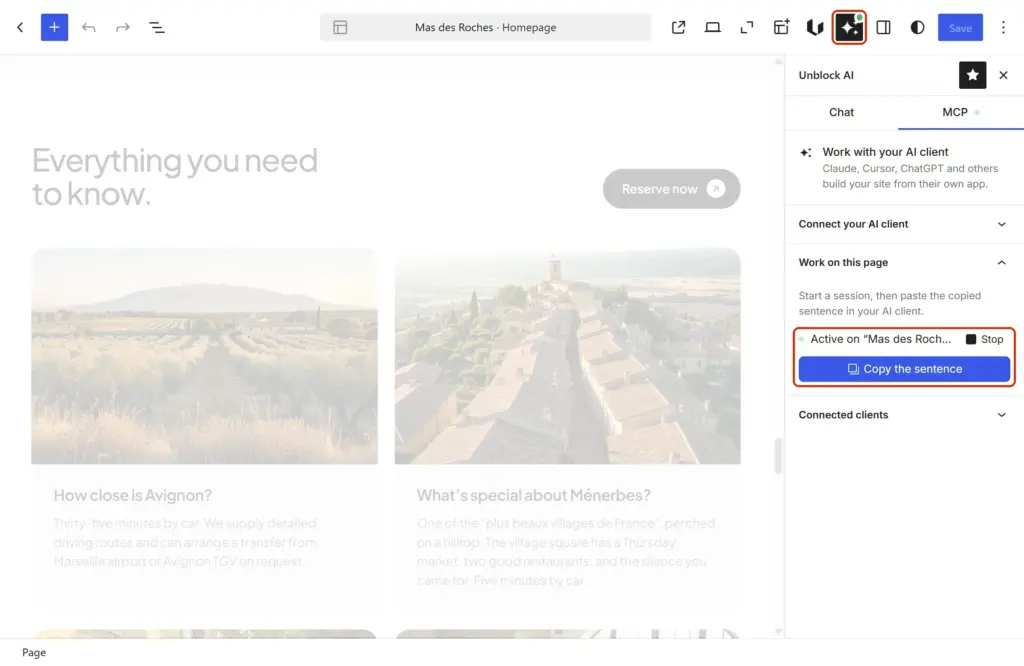
A session, to polish a page in detail. Open the page, go to Work on this page in the MCP tab and paste the sentence it copies into your AI client. The agent then works in your editor tab, so you see each change as it happens. Nothing is saved until you click Save.
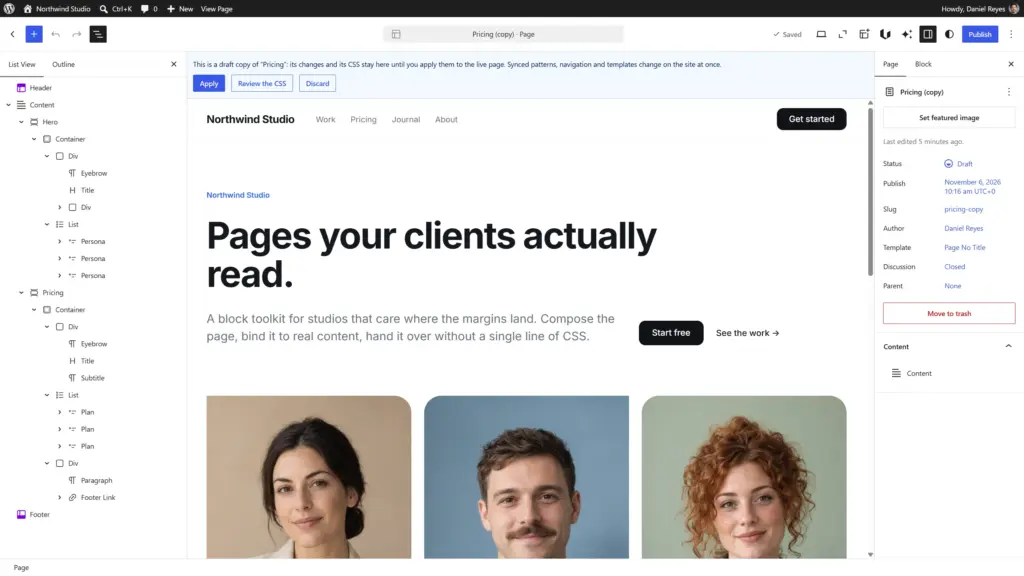
A draft copy, for bigger changes. The agent copies the page into a draft and works there. The CSS it writes stays with the copy, so the live site keeps its styles and only the copy’s preview shows the new ones. When you’re happy with it, click Apply in the copy’s banner, or tell the agent to apply it. Discard throws it away.
Everything stays under control
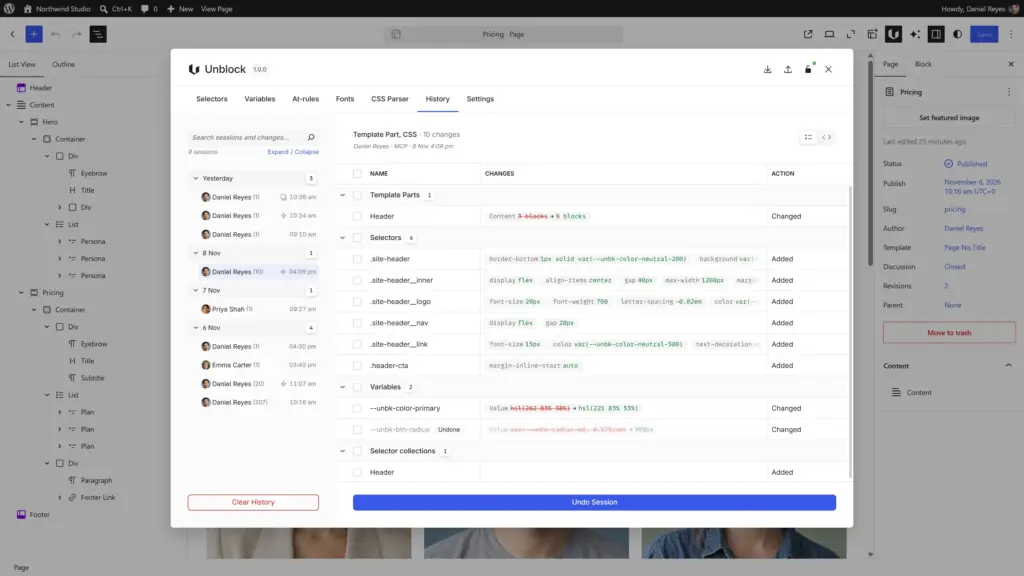
- Every change is recorded. The History tab lists what the agent wrote, session by session, with the diff. Undo one change or a whole session.
- Read only when you want it. A client approved in read-only mode can look at the site, never change it.
- Costs you can predict. Your agent runs on the AI subscription you already have, with no credits to buy from us. And it edits one block or one CSS rule at a time instead of rewriting the whole page, which saves tokens.
Don’t just vibe code. Build better.
Get started
The MCP Bridge comes with every Unblock plan, along with the AI chat and every other feature. You need WordPress 6.9 or later, an active license and an administrator account.
Connect your AI client · Get Unblock
This article was written and laid out by Claude Code, working on this site through the Unblock MCP. It placed every heading, paragraph, link and screenshot itself.
Build with AI.
Own what you build.
Edit content, refine layouts and hand over your project in Gutenberg. AI when you want it, Gutenberg when you need it.